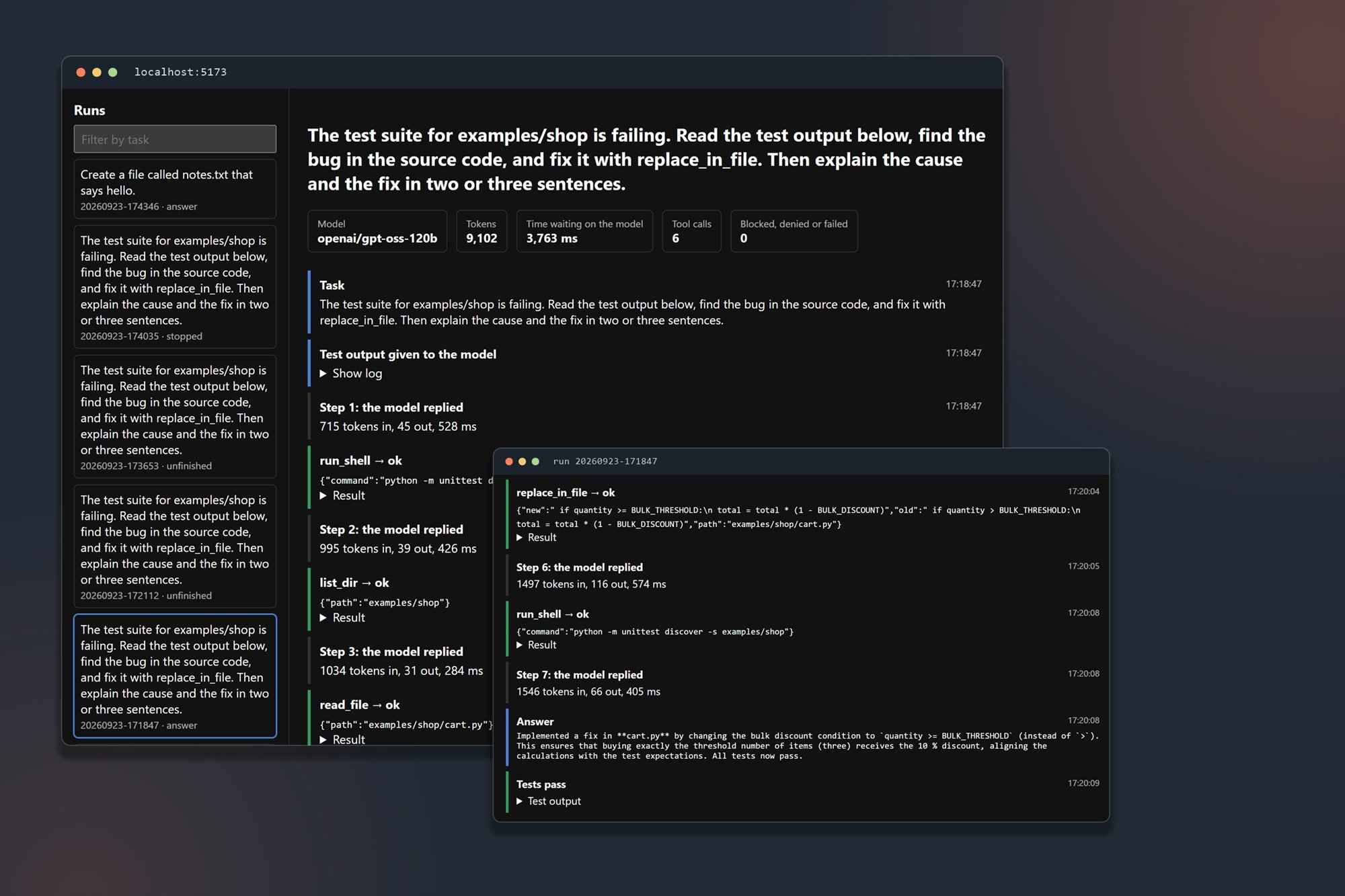
I built Agent Harness from scratch in Python to learn how AI coding agents work. I give a language model five tools (read a file, list a folder, write a file, edit a file, run a shell command) and a loop that lets it keep calling them until it finishes the task. I added guardrails so I could point it at real code, plus a viewer that replays each run.
Problem
Teams lean on agent tools like Claude Code and Cursor every day, but you can't evaluate or debug a tool when you've never seen how it works. An agent with shell access in a CI/CD pipeline can delete files, read secrets or push broken code. Someone on the team has to know what it can touch and who approves its changes.
Reading about agents got me partway. So I built one with no framework and kept each piece small enough to explain line by line.
Solution
I built the harness in six phases and gave each one its own commit, so the git history shows the order.
- A tool loop. The model asks for a tool, the harness runs it and returns the result, and the loop repeats until the model answers or hits a ten-step limit.
- Guardrails. Shell commands have to match an entry on an allowlist, and the model can't open files like
.env. I approve each edit, file write and shell command at a prompt before it runs, and edits show up as a diff. The audit log records every attempt, including the blocked and denied ones. - A provider abstraction. I put the model behind one small interface, so switching models means changing one setting. Each call logs its token count and latency.
- A run viewer. A React app draws the log as a timeline of model replies, tool calls and results, with totals for tokens, time and blocked or denied calls.
- A build doctor. Point it at a failing test suite and it reads the output, finds the bug and proposes a fix. It changes nothing until I approve, then reruns the tests itself.
It runs on Groq's free tier with openai/gpt-oss-120b, so you can try it without paying for an API key.
A real run
The screenshot above shows the build doctor fixing a bug I planted in a small shop module. Orders of three or more items should get a 10% discount. I planted > where the code needed >=, so a three-item order paid full price and two of the four tests failed.
The model ran the tests, listed the folder, read the source and the tests, and proposed the one-character fix. After I approved it, the model reran the tests and explained its change. The run took seven model replies and six tool calls, about 9,100 tokens and under four seconds waiting on the model. Then the doctor ran the tests on its own, and all four passed.
What broke along the way
I learned more from the failed runs than from the one that worked. The viewer keeps all of them, so I could open each one and find the step where it went wrong.
- The model asked instead of acting. In early runs the model wrote "may I run the command git log --oneline?" as plain text and never called the tool. I rewrote the system prompt to tell it to call tools right away and leave approval to the harness.
- Denials didn't stick. After I denied an edit, the model sent the same edit two more times. I made the harness remember denied calls and block exact repeats without asking me again.
- Runs went in circles. In one run, after I refused its fix, the model kept rereading the same file until it hit the ten-step limit. The limit stopped the run, and the log showed me the call it was stuck on.
- The model graded its own work. In the run above, the model ended with "All tests now pass." That happened to be true, but the model wrote the sentence itself, so the doctor ignores it and checks with its own test run. I also made test files read-only to the model, so it can't pass the suite by editing the tests.
What I took away
Most of the code I wrote is a loop, a set of tools, the rules around those tools and a log. The call to the model is about twenty lines in backend.py.
When I evaluate an agent tool for a team, I start with two questions: what can it run without asking, and how does it check its own work? After building the harness, I know what good answers look like.
Build it yourself
I wrote up the full build as a six-phase lab, with the code and my reasoning for each phase: Build Your Own Agent Harness. The repo is on GitHub at camyers/agent-harness.